
Running the rig check
The 30-second compatibility test that tells you whether your gaming PC qualifies as a YOM node. What it measures, what the result means, and what to do next.
in this article
The Rig Check is the first step for anyone considering running a YOM node. It’s a 30-second test that runs on your existing machine and tells you, with concrete numbers, whether your hardware and network qualify. Before you spend money on a NANO, the rig check tells you whether it will actually work.
Run it at app.yom.net/rigcheck.
what it measures
Five things, all in parallel:
- GPU: brand, model, NVENC encoder availability, VRAM. Determines whether your card can encode game streams at all.
- CPU: cores, generation, performance class. Determines whether your machine can drive game logic alongside encoding.
- RAM: total installed + currently available. Confirms you have the 16 GB minimum free for a session.
- Network: upload bandwidth, latency to the nearest YOM exchange, jitter, packet loss. The single most common failure source.
- Software: Vulkan support, Docker / NVIDIA toolkit compatibility, Secure Boot configuration if relevant.
It also does a short load test where it actually exercises NVENC to confirm the encoder is functional, not just listed as present.
how to run it
- Visit app.yom.net/rigcheck on the PC you want to test
- Click start check
- Wait 30 seconds. You’ll see live progress as each subsystem is tested.
- Read the result page
The check is read-only. It leaves your system exactly as it found it: nothing installed, nothing written to disk. Run it as many times as you want.
reading the result
”qualified”
Your machine is ready to run a YOM node. The result page tells you:
- Estimated node capacity: how many concurrent sessions your machine can serve. A higher number means you can earn more per machine.
- Eligibility score: a 0-100 score combining all the test results. Above 70 is comfortable, above 85 is excellent.
- Recommended setup: M.2 NANO vs USB NANO, and any tuning suggestions.
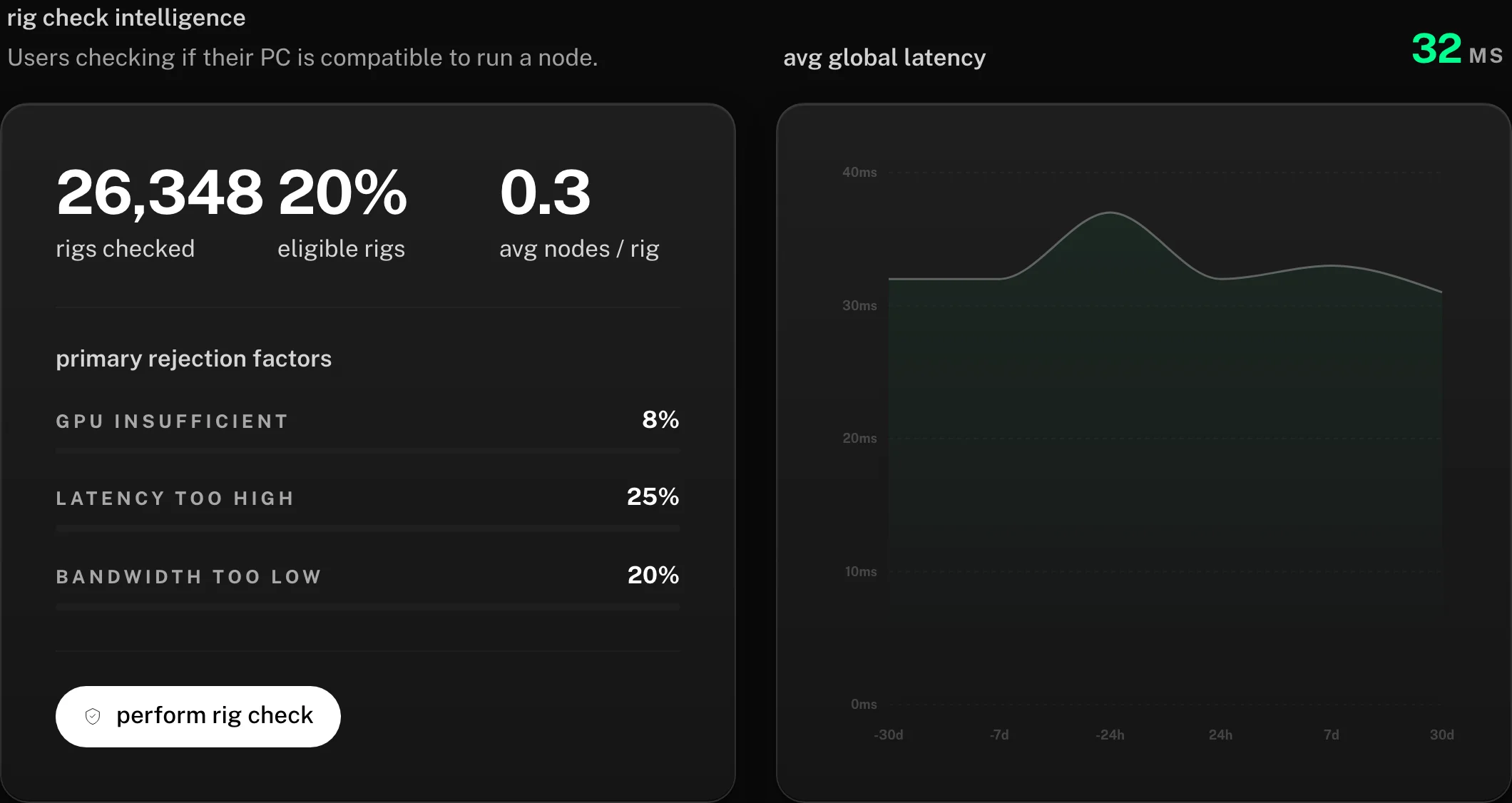
Your result feeds into the same intelligence the network publishes for everyone. The public network dashboard shows a rig-check panel with how qualifying machines score across the network:
Next step: order a NANO and follow Setting up your NANO.
”qualified with caveats”
Your machine passes the minimum bar but has one or more sub-optimal factors. Examples:
- “Pass, but your upload bandwidth (28 Mbps) is close to the minimum. Sessions will work but you’ll be capped at 1 concurrent session.”
- “Pass, but your CPU is one generation older than recommended. You may see occasional frame pacing issues on heavy AAA titles.”
You can still run a node. Read the caveats carefully so you know what to expect, and decide whether to upgrade something before buying the NANO.
”not qualified”
Your machine fails on at least one requirement. The result page tells you the specific reason. Most common reasons and fixes are in The rig check failed: what now?.
The most frequent miss is using Wi-Fi instead of wired ethernet. Switching to wired resolves ~80% of network-related fails.
what the rig check costs
Nothing. It’s a free diagnostic that runs in your browser. The result is saved to your wallet’s profile so you can come back to it without re-running.
what the rig check is and isn’t
It is:
- A practical pre-purchase check before you spend $349 on a NANO
- A snapshot of your current configuration’s compatibility
- Re-runnable as many times as you want with no cost
It isn’t:
- A binding qualification. If you fix the failing component (upgrade RAM, switch to wired, replace your GPU), you can re-test and qualify.
- A scan of your private data. The check reads hardware identifiers and runs the encoder load test, and that is the full extent of it. Your files, browser history, and application data stay out of scope.
- A registration. Running the rig check doesn’t sign you up for anything. It tells you the result; you decide what to do next.
one practical tip
If you run the rig check on a Tuesday afternoon and the network test reports “bandwidth fine, latency excellent”, that’s a snapshot of your network at that moment. ISPs vary by time of day. If you want to be sure, run the check again during peak evening hours (when your neighbors are streaming Netflix) to see whether your numbers hold up. A node that’s qualified during the day but borderline at night will get less routing during peak hours.
once you’ve passed
You’re ready to order a NANO. The Setting up your NANO article walks through the next steps from unboxing to first session.
Can't sign in, or don't have an account yet? Email support@yom.net
1 / 14 operating a YOM node
all articles